 Skip to content
How to Automate Client Onboarding | Certified Expert Guide & Best Practices
Introduction
Bringing on a new client should feel exciting new relationship new project fresh start. But if you’ve run a business for more than a few months you already know the reality looks a bit different in practice.
Contracts sitting in someone’s inbox for days because nobody got around to chasing it. The same intake form getting emailed back and forth with a typo in the client’s own name. That awkward moment when a client asks did you get my documents for the third time that week and you’re not entirely sure yourself.
None of that’s really about the client, if you think about it. It’s the process underneath most businesses are still running that process manually one email at a time hoping nothing quietly slips through the cracks.
This is where automate client onboarding comes into the picture. Instead of chasing paperwork and repeating the same steps for every single new client, automation takes over the repetitive parts so your team can actually focus on the relationship itself. Whether you’re running a small agency, a consulting practice, or a growing service business, figuring out how to automate client onboarding properly changes how those first thirty days feel, for you and honestly for the client too.
What Does Automating Client Onboarding Actually Mean?
A lot of people hear “automation” and picture something complicated, expensive software, a whole new system nobody has time to learn. Its really not that dramatic once you get into it .
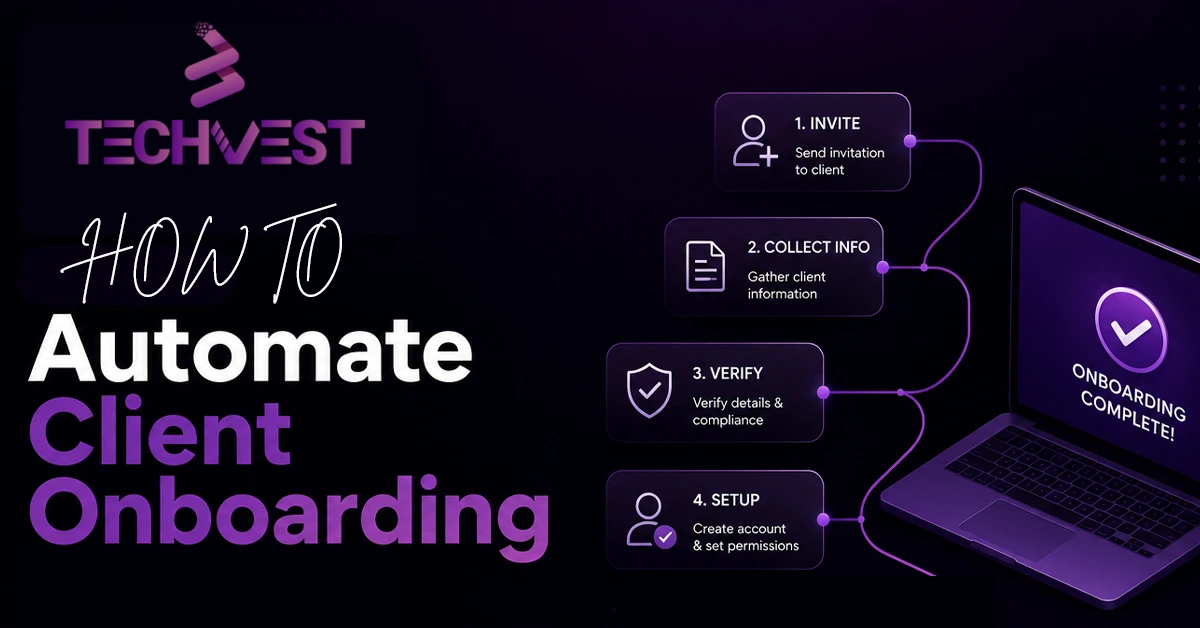
At its core ( automate client onboarding ) just means setting up a system where routine steps happen on their own once something triggers them instead of someone manually doing the same thing everytime. A new client signs a contract and that single action sends them a welcome email creates their folder assigns tasks to your team and books the kickoff call. Nobody has to remember to do any of it by hand.
There’s usually a handful of moving pieces working together behind the scenes. Digital contracts and e-signatures replace printing and scanning entirely. Automated welcome sequences replace someone manually writing the same email for the fifth time this month. Intake forms feed straight into your project management tool instead of sitting unread in an inbox somewhere. Task assignments trigger the moment a client completes a specific step, and payment or invoicing gets tied in too so nothing has to be chased down separately by anyone.
Real client onboarding automation doesn’t strip the personal touch out of your business, whatever people assume going in. It clears out the busywork so that personal touch actually has room to happen.
Why Manual Onboarding Is Costing You More Than You Think
Most business owners don’t realize how much time manual onboarding actually eats until they sit down and track it properly answering the same three questions over and over copy pasting the same welcome message with tiny edits each time chasing a signature that should’ve come back three days ago and didn’t.
Here’s the part that really matters though, and it’s easy to miss. Every delay in onboarding is a small delay in trust. Clients form their first real impression of your business during those early days, not during the sales call where everyone’s on their best behavior. If it takes a week to get organized or feels disjointed or the client keeps having to chase you for updates that impression sticks around longer than you’d think even when the actual work later turns out excellent. If you’ve never sat down and mapped out how to automate client onboarding process steps properly it’s genuinely easy to underestimate how much of this is quietly piling up week after week.
Once things get automated, that whole experience tightens up noticeably. Clients get instant confirmations instead of silence. Documents arrive the moment they’re actually needed, not two days late. Nothing depends on someone in your office remembering to hit send at the right moment. And a lot of businesses end up pairing this with client onboarding automation for internal handoffs too, so sales, account management, and delivery are all working off the same information without anyone typing an update by hand.
There’s a money side to this as well, worth mentioning. Time your team spends manually managing onboarding is time that isn’t going toward billable work or actually growing the business. Automating even part of that process frees up hours that add up fast once you look across a full month.
How to Automate Client Onboarding, Step by Step
Getting started doesn’t mean rebuilding your entire business overnight — check out this startup business resource guide if you’re setting up your operations from scratch — and honestly, most businesses see the biggest wins from automating just a few key stages first.
It usually helps to start by mapping out exactly what happens right now, from the moment a client signs to the moment they’re fully set up and working with you. This step alone tends to reveal more repetitive tasks than people expect going in, and usually a few steps that don’t even need to exist anymore.
From there, digital contracts with e-signature tools remove the printing, scanning, and back-and-forth emailing that eats up so much time. Most platforms send automatic reminders too, so nobody’s manually following up on a document that’s just sitting there unsigned. Pair that with a short automated welcome sequence, triggered the moment a contract comes back signed, and clients stay informed without anyone lifting a finger. Confirmation, next steps, what to expect, all sent consistently every time without variation.
Connecting your intake forms directly into your project management or CRM system cuts out a huge chunk of manual data entry too. And once a client finishes those onboarding steps, tasks should assign themselves automatically to the right people on your team, rather than relying on someone remembering to loop the right person in. Tying your payment system into the same workflow means invoices go out on their own and payment confirmations trigger whatever comes next, without anyone having to chase it down manually.
The Real Benefits of Automated Client Onboarding
Manual processes tend to vary depending on who’s handling them that day and how busy things got. Automation means every client gets roughly the same smooth experience, whether it’s your first client of the year or your fiftieth.
There’s also the speed side of things. The quicker a client feels set up and organized the quicker actual work can start automated onboarding shortens that gap by a lot sometimes turning what used to take a full week into a single day.
Errors drop too, and this one matters more than people expect. When humans manage repetitive processes by hand, things slip eventually, a form doesn’t get sent, a task doesn’t get assigned to anyone. Automation removes most of that risk simply because the system doesn’t forget the way people occasionally do.
And then there’s the time it frees up. Every hour not spent on repetitive admin work is an hour that goes toward the kind of work that actually grows the relationship, and the business along with it. Clients notice this too, even if they couldn’t explain exactly why. Automated confirmations, clear next steps, and quick turnarounds all quietly signal that they made the right call working with you.
Common Onboarding Problems Automation Actually Solves
A lot of businesses just assume their onboarding issues are part of doing business. Most of the time, they’re really not, they’re fixable.
Clients constantly asking for status updates usually means there’s no automatic confirmation happening anywhere in the process. Setting up instant email or notification triggers solves this almost overnight. Documents getting lost somewhere in an email thread usually points to a missing centralized intake system, and connecting forms directly to your workflow tool clears that up fast.
An inconsistent onboarding experience, where one client gets a smooth start and the next one falls through the cracks entirely, usually means the process lives in someone’s head instead of an actual documented system. Building it into automated workflows takes that risk away, since it no longer depends on any one person remembering every single step correctly.
Delayed payments often trace back to invoicing that only goes out once someone remembers to send it manually. Automating that connection removes the delay almost completely.
When Should You Start Automating Your Onboarding Process?
You really don’t need to wait until onboarding becomes a full-blown problem before doing something about it.
It’s worth looking into if you’re spending more than an hour or two per client just on setup and paperwork, or if your team keeps fielding the same onboarding questions over and over from different clients. Same goes if clients regularly need reminders to send documents back, or if your onboarding experience feels noticeably different depending on who happens to be handling it that week. If you’re growing and already sense that manual processes won’t keep up with more clients coming through the door, that’s usually a clear sign too, along with missed handoffs between sales and delivery teams that keep causing friction.
Most businesses see the biggest return once they’re onboarding more than a handful of clients a month, though even smaller operations benefit from clearing out the repetitive parts early rather than waiting.
How to Choose the Right Approach for Your Business
Not every automation setup fits every business and that’s completely fine picking the right one matters far more than picking whatever option has the longest feature list .
Look for tools that actually integrate with what you’re already using rather than asking you to abandon your current systems entirely just to make the switch . Genuine ease of use matters more than a wall of features you’ll never actually touch clear reporting helps too so you can see exactly where each client sits in the process at any given moment without digging through emails. A good setup should stay flexible enough to adjust as your onboarding process changes over time, because it will, sooner than you’d expect.
A good consultant or platform won’t push the most expensive option first thing. They’ll ask about your actual process and recommend whatever genuinely fits it.
Why Working With Certified Experts Matters Here
Setting up automation sounds simple enough in theory, but doing it well takes understanding both the tools themselves and how client relationships actually work day to day. Certified experts know how to build workflows that feel personal rather than robotic which is honestly where a lot of businesses go wrong on their first attempt at this.
They know how to sequence communications so clients never feel spammed or worse ignored entirely . They understand which steps genuinely benefit from automation and which ones still need an actual human involved . That balance is really the whole difference between onboarding that feels efficient and onboarding that just feels cold.
Final Thoughts:
Manual onboarding might feel manageable while you’re still small but it rarely stays that way as your client base grows learning how to automate client onboarding properly saves your team real time gives every client a consistent first impression and frees you up to focus on the work that actually matters in the long run if your current process still runs on memory and manual follow ups / it might genuinely be time to build something better.
Frequently Asked Questions
What does it mean to automate client onboarding?
It means routine steps run on their own once triggered. For example, a signed contract sends a welcome email, assigns tasks, and books the kickoff call.
How do I automate client onboarding step by step?
Map your current process first. Then add e-signature contracts, a welcome sequence, connected intake forms, automatic task assignment, and invoicing.
What are the benefits of automated client onboarding?
Every client gets a consistent experience and faster setup. Errors drop, and your team gains time for billable work.
What onboarding problems can automation solve?
It fixes constant status requests, lost documents, and inconsistent onboarding. It also removes payment delays caused by manual invoicing.
When should I start automating onboarding?
Start when setup and paperwork take over an hour or two per client. Also start when your team keeps answering the same questions.
How do I choose the right automation approach?
Pick tools that integrate with your current systems and are easy to use. Make sure they give clear reporting and stay flexible as your process changes.
